AI Workflow Automation with n8n
Modern businesses often spend hours performing repetitive tasks such as reading emails, extracting information, updating spreadsheets, entering information into databases, sending follow-up messages, and moving data between applications. We develop AI-powered workflow automation solutions using n8n to automate these processes and connect existing business systems with modern artificial intelligence and cloud services.
Real-World n8n Workflow Example
This project demonstrates an automated workflow that receives incoming information, processes it using artificial intelligence, extracts important data, and sends that information to other business applications.
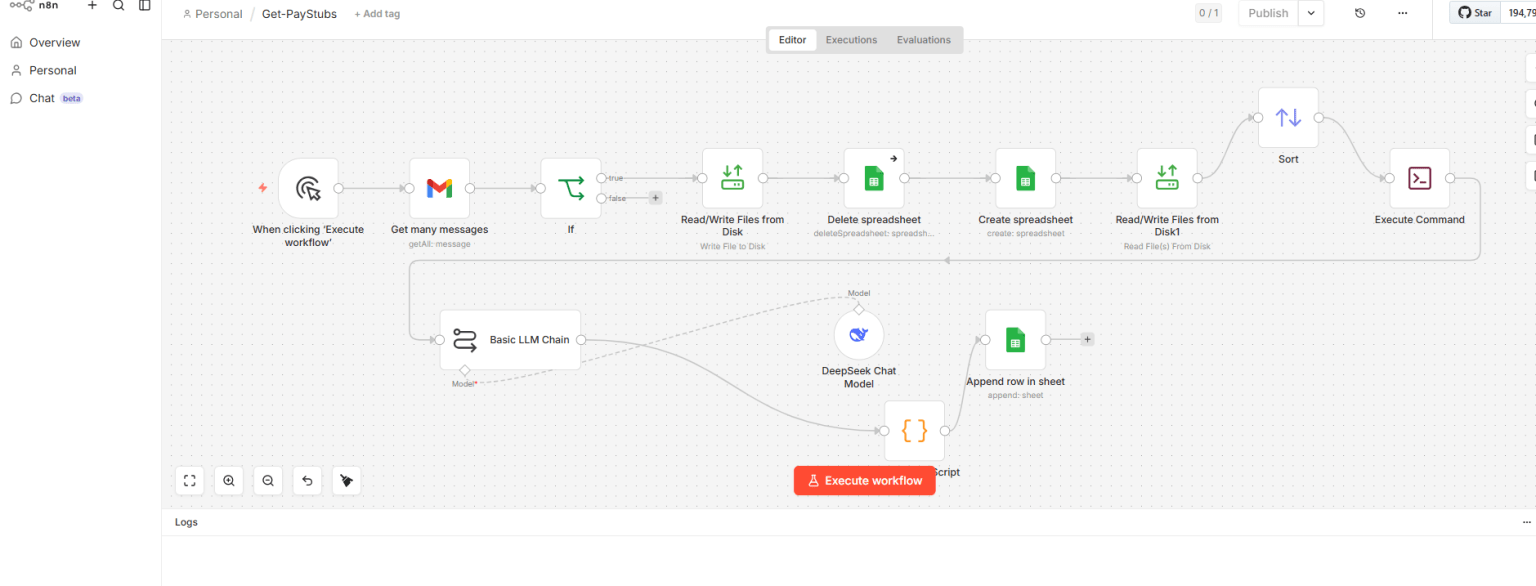
Example of an n8n workflow integrating email, artificial intelligence, APIs, databases, and business applications.
How the Workflow Works
The automation begins when an event occurs, such as receiving an email, submitting a web form, uploading a document, or calling a webhook.
n8n then coordinates the entire process.
Incoming Email or Request
          ↓
      n8n Workflow
          ↓
   Extract Information
          ↓
      AI Analysis
          ↓
   Structure the Data
          ↓
    Validate Results
          ↓
 Database / Application
          ↓
 Notification or Follow-Up
Instead of requiring an employee to manually move information between applications, the workflow performs those steps automatically.
AI-Powered Data Extraction
Emails and documents contain valuable information, but that information is usually unstructured.
Artificial intelligence can analyze the content and identify information such as:
- Customer names
- Company names
- Email addresses
- Phone numbers
- Dates
- Invoice numbers
- Order numbers
- Dollar amounts
- Products and services
- Customer questions
- Requested actions
The extracted information can then be converted into structured data that other applications can process.
Automated Email Processing
Email is the starting point for many business processes.
Using n8n and email APIs, a workflow can automatically detect incoming messages, retrieve their contents and attachments, analyze the information, and determine what should happen next.
For example:
Customer Email
      ↓
n8n Detects Message
      ↓
Retrieve Email & Attachments
      ↓
AI Analyzes Content
      ↓
Extract Important Information
      ↓
Locate Customer Record
      ↓
Update Business System
      ↓
Generate Follow-Up
This can significantly reduce repetitive email processing and manual data entry.
Google Sheets Integration
n8n can automatically create and update information in Google Sheets.
For example, information extracted from an email can automatically be added to a spreadsheet without requiring an employee to copy and paste the information manually.
Google Sheets can also provide an easy way for employees to review information generated by an automated workflow.
Microsoft SQL Server Integration
For larger business applications, workflow information can be stored directly in Microsoft SQL Server.
Email / Document
       ↓
AI Processing
       ↓
n8n Workflow
       ↓
Data Validation
       ↓
SQL Server
       ↓
Business Application
This allows AI and workflow automation to become part of an organization’s existing software infrastructure.
Connecting Existing Applications with AI
Businesses do not necessarily need to replace their existing applications to take advantage of artificial intelligence.
n8n can act as an integration layer between existing software and newer AI and cloud services.
Existing Application
        ↕
    SQL Server
        ↕
     REST API
        ↕
       n8n
        ↕
Artificial Intelligence
        ↕
  Cloud Services
This approach can be particularly valuable for organizations with established C#, .NET, SQL Server, FoxPro, Visual FoxPro, or other legacy applications.
Existing applications can continue performing the business functions they were designed for while new automation capabilities are added around them.
Human Approval Workflows
Not every business decision should be completely automated.
n8n workflows can include human approval steps before important actions are completed.
For example:
AI Generates Response
        ↓
Employee Reviews Response
        ↓
Approve or Correct
        ↓
n8n Continues Processing
        ↓
Email Sent
This combines the speed of artificial intelligence with human oversight.
Error Handling and Validation
A production workflow needs more than simply connecting several n8n nodes.
Automated processes should be designed to handle problems such as:
- Missing information
- Invalid data
- Duplicate records
- API failures
- Authentication errors
- Database errors
- Unexpected document formats
- Unavailable external services
Instead of silently failing, the workflow can identify the problem, record the error, and notify the appropriate person.
Business Processes That Can Be Automated
n8n and AI can be used to automate many common business processes, including:
- Email processing
- Customer follow-up
- Lead processing
- CRM updates
- Document processing
- Invoice data extraction
- Database updates
- Report generation and distribution
- Approval workflows
- Spreadsheet processing
- Notifications
- Scheduled processing
- Data synchronization
- API integration
- Legacy application integration
Technologies Used
n8n | Artificial Intelligence | OpenAI | Gmail API | Google Sheets | Microsoft SQL Server | REST APIs | Webhooks | JSON | C# | .NET | Docker | Linux | Azure
The technologies used for each project depend on the applications and business processes being automated.
More Than Just AI
Effective automation is not simply about adding artificial intelligence to an application.
The real objective is to identify repetitive work, understand the existing business process, and develop a reliable workflow that connects the applications and information an organization already uses.
My background in software development, databases, reporting systems, legacy applications, and modern AI automation allows me to approach automation as a complete software integration project rather than simply an AI experiment.
Need an n8n or AI Automation Solution?
If your organization has employees repeatedly copying information between emails, spreadsheets, databases, websites, reports, or business applications, those processes may be candidates for automation.
I develop custom solutions using n8n, AI, C#, .NET, SQL Server, REST APIs, webhooks, Docker, Linux, and existing business applications.
The goal is to automate repetitive work while continuing to use the business systems and processes that already provide value.